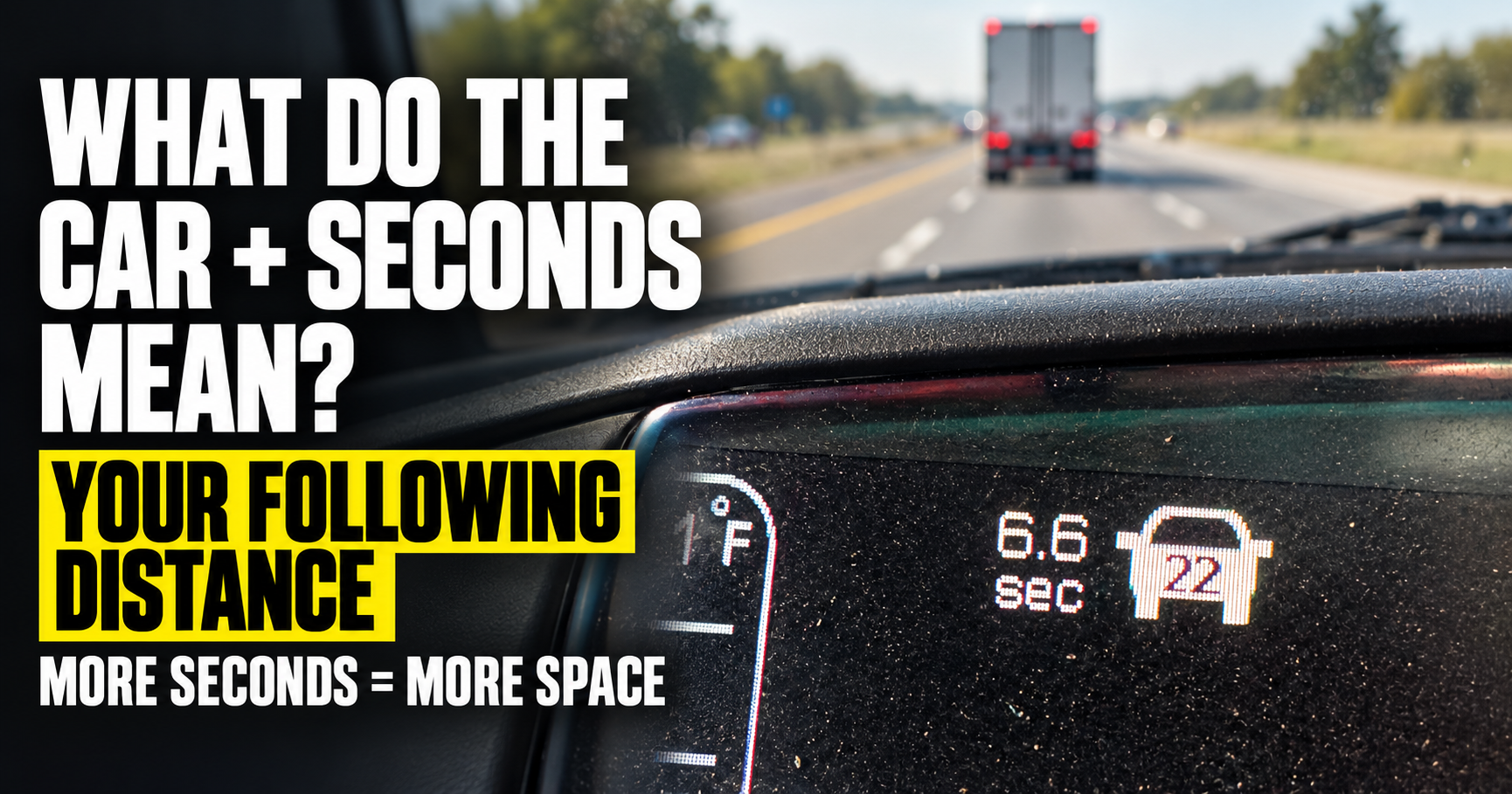
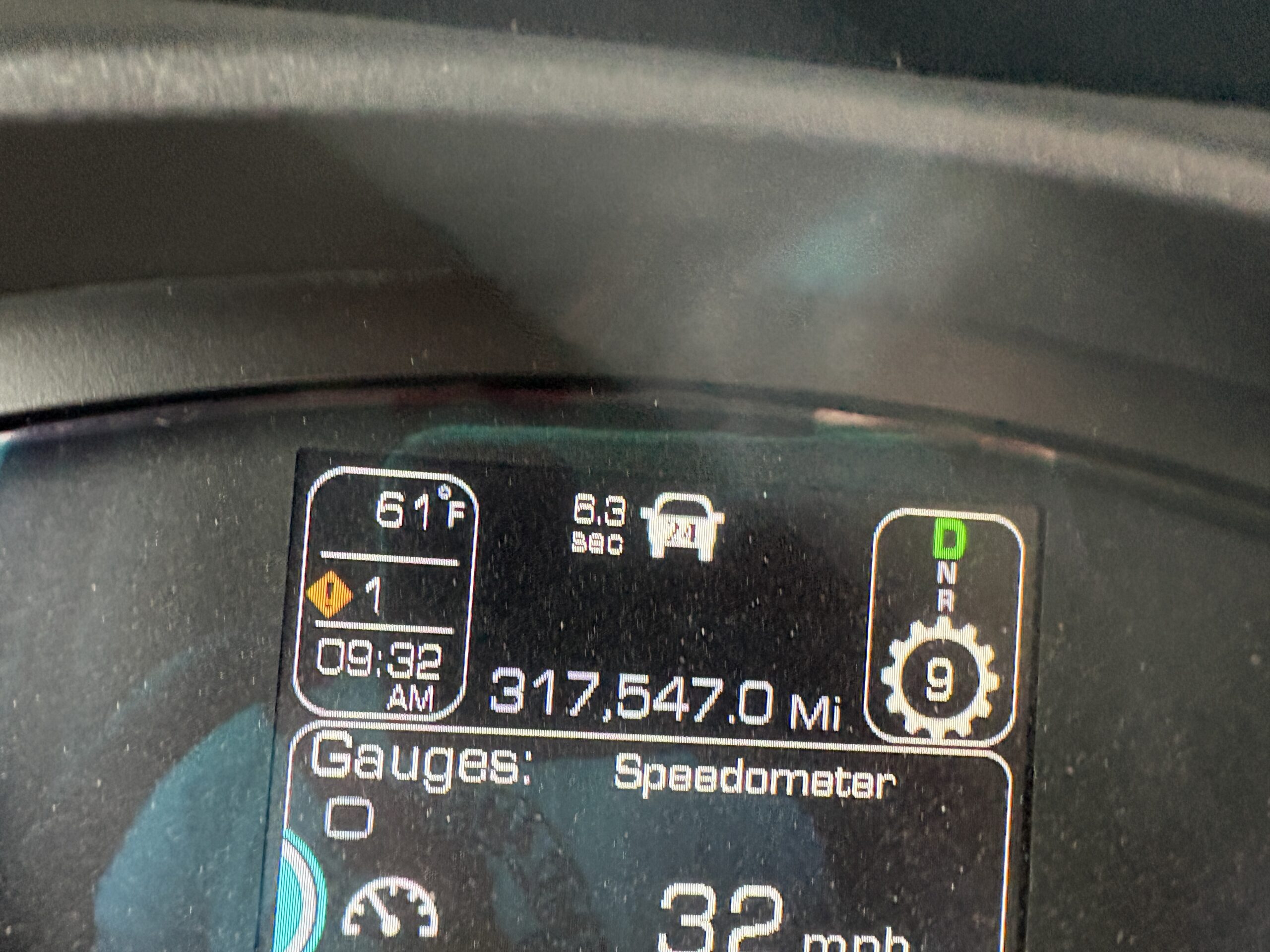
I kept noticing something pop up on the Kenworth dashboard whenever another vehicle moved in front of me.
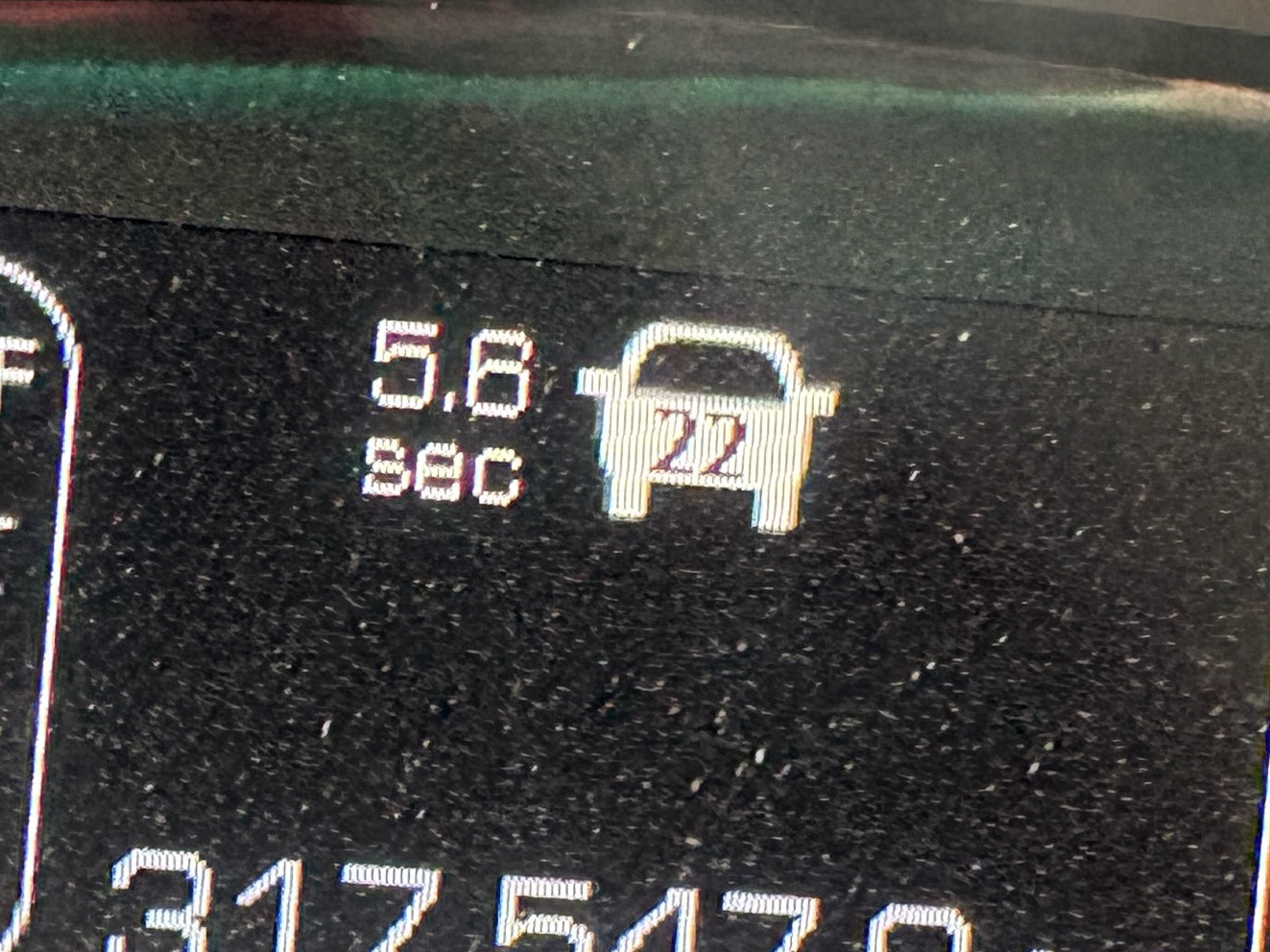
A little car appeared.
Beside it was a number followed by SEC.
Sometimes it might say 6.3 seconds. A little later it might show 5.8 seconds. If the vehicle moved away, the display changed again.
Nobody had ever explained this little indicator to me, so naturally I started wondering what it was actually measuring.
Was it how long the car had been in front of me?
Was it part of the cruise control?
Was it warning me that I was following too closely?
After digging into the Kenworth and Bendix documentation, the answer is actually pretty useful.
That number is your estimated following time behind the vehicle ahead.
In other words, the truck is estimating how many seconds separate you from the vehicle it’s detecting in front of you.
What Does the Little Car Symbol Mean?
The little vehicle represents a vehicle that the truck’s forward detection system has picked up ahead of you.
Many Kenworth trucks are equipped with Bendix Wingman collision-mitigation technology or a related driver-assistance system.
Depending on the exact system and truck configuration, radar and other sensors can monitor what’s happening in front of the truck.
When the system identifies a vehicle ahead, the dashboard can show that vehicle and your approximate following distance.
Kenworth has used Bendix Wingman systems on its Class 8 trucks for years. These systems can provide following-distance alerts, impact warnings, stationary-object alerts, and, on equipped trucks, adaptive cruise and automatic braking functions.
The little car on the display is basically telling you:
“I’m tracking a vehicle in front of you.”
What Does the SEC Number Mean?
This is the part I originally misunderstood.
SEC means seconds.
But it isn’t counting how long the vehicle has been there.
It’s showing your following time, sometimes called the time gap.
The system looks at how far the vehicle is ahead of you and combines that information with your current speed.
It then calculates approximately how many seconds it would take your truck to reach that vehicle’s current position if your speed remained the same.
That’s why the number constantly changes.
What Does 6.3 Seconds Mean?
If the display says:
6.3 SEC
that means there’s approximately a 6.3-second following interval between your truck and the detected vehicle ahead under the current conditions.
It doesn’t necessarily mean the other vehicle is 6.3 seconds away from being hit.
That’s an important distinction.
Both vehicles may be moving at roughly the same speed.
The number is simply expressing the physical gap between the vehicles as time based on your truck’s current speed.
Why Measure Following Distance in Seconds Instead of Feet?
This makes much more sense once you think about speed.
Suppose you’re 100 feet behind another vehicle.
At 15 mph, that’s a pretty substantial gap.
At 70 mph, 100 feet disappears incredibly quickly.
So saying:
“I’m 100 feet behind that car”
doesn’t tell you nearly as much as you might think.
Following time automatically accounts for your speed.
Bendix gives a simple example.
At 60 mph, a truck travels approximately 88 feet every second.
If the vehicle ahead is 88 feet from the front of the truck, the following-distance display would therefore show approximately:
1.0 SEC
That makes seconds much more useful to a driver than simply displaying raw distance in feet.
Why Does the Number Change Even When the Car Looks About the Same Distance Away?
Because your speed matters.
The system isn’t just measuring physical distance.
It’s calculating a time gap.
If you speed up while the physical gap stays similar, the number of seconds can decrease.
If you slow down, the number can increase.
The vehicle ahead can also accelerate or slow down, changing the physical distance between you.
That’s why you might see:
6.3 SEC
then
5.8 SEC
then
4.5 SEC
without anything dramatic happening.
The system is continuously recalculating the relationship between your truck and the detected vehicle.
Why Does the Little Car Sometimes Disappear?
If there’s no vehicle ahead within the system’s detection conditions, there’s nothing for it to display.
A vehicle might:
- Turn off the road.
- Change lanes.
- Pull far enough ahead.
- Move outside the sensor’s detection area.
Once the system no longer has a valid forward vehicle to track, the little vehicle or following-time information may disappear or change.
Then another vehicle moves into your lane and suddenly it comes back.
That’s exactly why I originally noticed it.
Is This Part of Adaptive Cruise Control?
It can be associated with the same driver-assistance hardware, but the following-distance monitoring isn’t necessarily limited to times when adaptive cruise control is actively controlling the truck.
Kenworth documentation for Bendix systems describes following-distance alerts as being available independently of active cruise control in applicable configurations.
That’s useful because you don’t stop needing following-distance information simply because cruise control isn’t turned on.
What Happens if You Get Too Close?
This is where the system becomes much more than an interesting number on the dashboard.
Bendix Wingman systems can provide Following Distance Alerts when your truck gets too close to the detected vehicle ahead.
Depending on the system and configuration, those alerts can become progressively more noticeable as the following distance decreases.
You may get:
- A visual warning.
- An audible warning.
- Increasingly urgent alerts as the gap gets smaller.
Kenworth documentation for Wingman systems describes progressively stronger warnings as following distance becomes dangerously short.
At the highest warning levels, the system is essentially telling you:
You need to do something now.
Don’t Treat the Number Like a Video Game
Once you understand what the seconds mean, it’s tempting to start watching the number constantly.
I wouldn’t.
Your eyes still belong on the road.
The display is supplemental information.
It’s there to help you understand what’s happening and warn you when the following gap becomes unsafe.
You shouldn’t be staring at the dashboard trying to maintain some exact decimal number.
Look ahead.
Leave room.
Watch traffic.
Use the display as another piece of information rather than turning it into a target.
Why Following Distance Matters So Much in a Semi Truck
Following distance matters in every vehicle.
It matters even more when you’re driving something weighing tens of thousands of pounds.
A loaded commercial truck doesn’t stop like a passenger car.
You’re dealing with considerably more mass, air brakes, changing road conditions, vehicle weight, brake condition, reaction time, and whatever the driver ahead decides to do.
That’s why CDL training spends so much time talking about following distance and stopping distance.
The little seconds display gives you a real-time way to see something that’s otherwise difficult to judge precisely from the driver’s seat.
The Number Can Teach New Drivers Something
This may actually be my favorite thing about the display.
New drivers hear instructors say:
“Leave more following distance.”
But judging that distance from the driver’s seat of a large truck takes experience.
The display gives you feedback.
You might think you’re leaving plenty of room and then notice the time gap is much shorter than you expected.
Or you might look at a vehicle that seems fairly close and discover there’s actually a substantial time gap because you’re traveling slowly.
After driving with the system for a while, you start getting a better feel for what different following distances actually look like through the windshield.
Don’t Assume the System Sees Everything
This is extremely important.
Driver-assistance technology isn’t a replacement for the driver.
Kenworth specifically warns that Bendix systems may have difficulty detecting certain vehicles and objects, particularly those with limited radar-reflective surfaces.
Weather, road conditions, sensor obstruction, unusual vehicles, curves, and other circumstances can also affect driver-assistance systems.
So if you can see a motorcycle, farm equipment, stopped vehicle, or another hazard but the dashboard isn’t showing it, trust what you’re seeing and drive accordingly.
The system is helping you.
It isn’t driving for you.
This Is Different From the Two Air Pressure Gauges
This dashboard display is also a good example of how much information modern trucks give drivers beyond the traditional mechanical gauges.
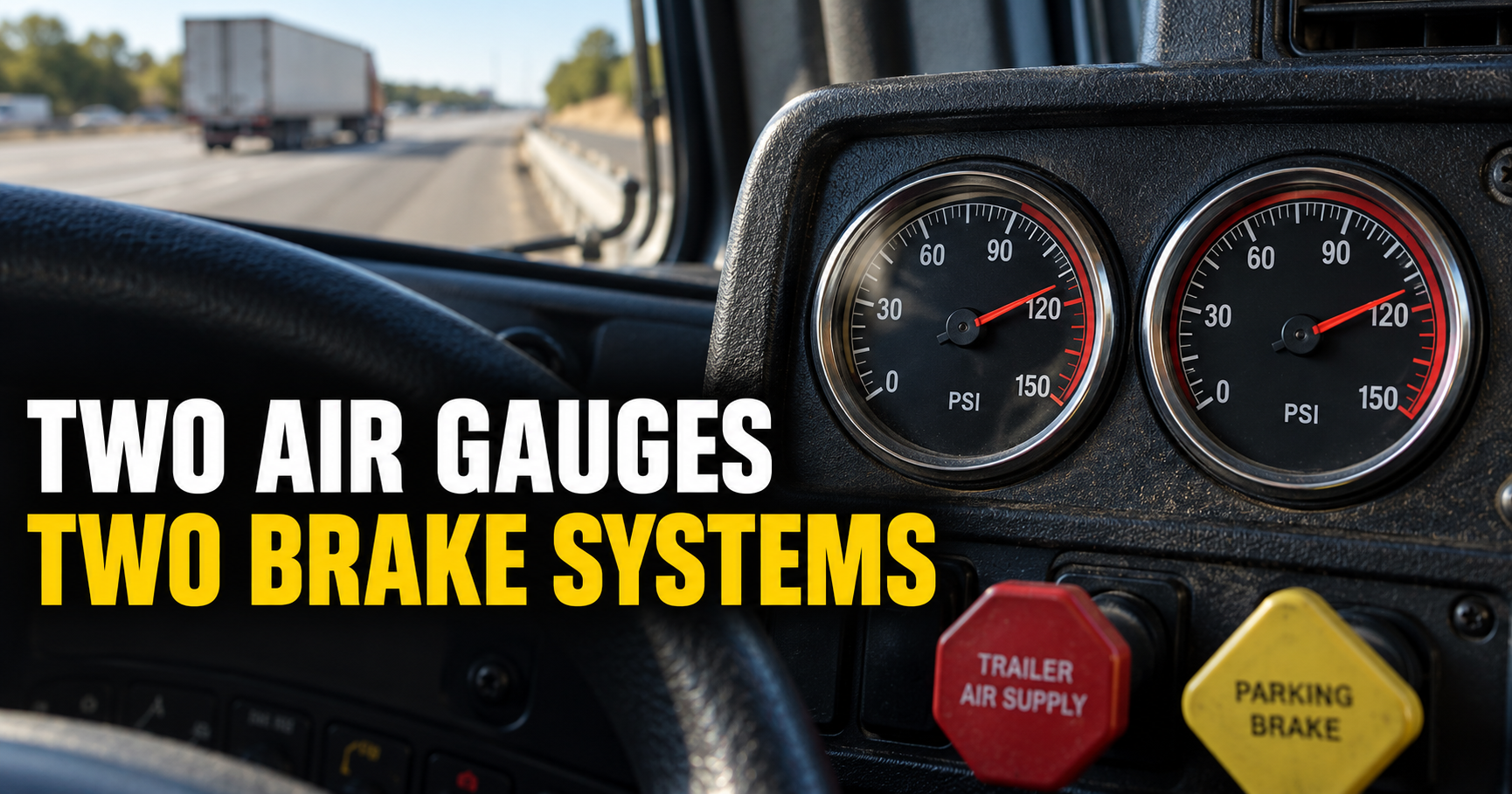
We’ve already covered why semi trucks have two air pressure gauges, which monitor the truck’s primary and secondary air systems.
Those gauges tell you what’s happening inside the truck.
This following-distance display is looking outward.
It’s helping tell you what’s happening in front of the truck.
Understanding both kinds of information makes the dashboard a lot less intimidating.
Frequently Asked Questions
What does the little car on a Kenworth dashboard mean?
On trucks equipped with the applicable Bendix driver-assistance system, the vehicle icon can indicate that the system has detected and is tracking a vehicle ahead.
What does SEC mean next to the car?
SEC means seconds. It represents the approximate following-time gap between your truck and the detected vehicle ahead.
Does 5 seconds mean I’ll hit the car in 5 seconds?
No. Both vehicles may be traveling at similar speeds. The number expresses the current physical following gap as time based on your truck’s speed.
Why does the seconds number keep changing?
Your speed, the other vehicle’s speed, and the physical distance between the vehicles are constantly changing. The system recalculates the time gap accordingly.
Does this only work with cruise control turned on?
Not necessarily. Applicable Bendix following-distance alerts can operate independently of active cruise control.
Will the truck warn me if I get too close?
On equipped systems, yes. Bendix Wingman following-distance technology can provide visual and audible alerts as the time gap becomes too short.
Does the truck automatically brake?
Some Bendix Wingman configurations include collision-mitigation and automatic braking capabilities, but exact features vary by truck and system. Check the equipment and owner’s information for the specific truck you’re driving.
Can I rely on the system instead of judging following distance myself?
No. It’s driver-assistance technology. The driver remains responsible for maintaining a safe following distance and responding to traffic conditions.
Now That I Know What It Is, I Actually Like Having It
This was one of those dashboard features I kept seeing without anyone ever explaining it.
Once I found out what it was doing, it became much more useful.
The little car tells me the truck sees a vehicle ahead.
The seconds tell me approximately how much following time I have at my current speed.
And if that number gets too small, the system can warn me before the situation gets worse.
It’s a pretty simple feature once somebody explains it.
But for a new truck driver who’s never been told what that little car and SEC number mean, it can look completely mysterious the first few times it pops up.
Author: Ethan Cole
Ethan Cole writes about commercial truck technology, driver-assistance systems, and everyday equipment for TruckingResource.com. His guides focus on explaining the dashboard features and truck systems drivers encounter on the road without burying the answer in technical jargon.